Listing Grader
Paste your eBay listing link (or item ID) and we'll benchmark your title, item specifics, and images against your top competitors: category scores up top, then opportunities, diagnostics, and passed checks below.
Frequently asked questions
Everything about how Listing Grader scores your eBay listing and where the numbers come from.
What does Listing Grader do?
It audits a single eBay listing and benchmarks it against comparable listings currently live on eBay, so you know exactly where you stand versus your real competition, not against a generic checklist.
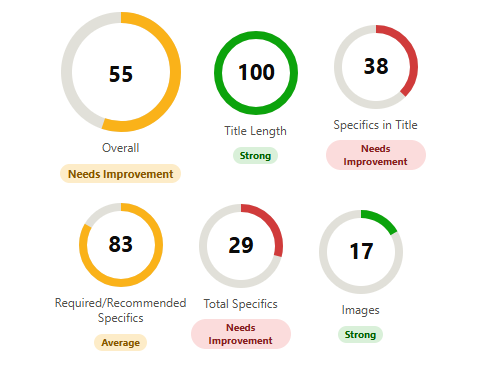
It scores: title length and keyword coverage, how many item specifics appear in your title, required/recommended specifics coverage, total item specifics filled in, and image count, plus a separate, unscored view of your price and shipping position.
How does Listing Grader work?
1. Paste your eBay listing URL or item ID into the form. 2. Enter your email address. 3. Click ‘Run audit’. 4. Wait a few seconds while we pull comparable listings and generate your report.
You'll see your results on screen immediately, and we'll also send the full report to your email so you can come back to it later.
Is Listing Grader free?
Yes, completely free: no signup, no credit card, and no limit on how many listings you can check. Run it again after making changes to see how your score moved.
How reliable is the competitor benchmark?
Each score is based on a set of comparable listings pulled for your specific item, so reliability scales with how many comparable listings exist for that category. We label each dimension with a confidence level (high, moderate, or low) based on that sample size.
When the comparable sample is small, we flag it directly in your report, so you know to treat ‘Strong’, ‘Average’, or ‘Needs Improvement’ as directional rather than exact.
What should I do once I have my results?
Start with your biggest opportunity: we rank suggestions by how many composite-score points fixing them is worth, so the top of the list is where your time pays off fastest.
Quick wins (adding specifics, lengthening your title, adding photos) can usually be done immediately. Once you've made changes, run the report again on the same listing to confirm your score actually improved.
Instant eBay listing audit, benchmarked against real competitors
Listing Grader analyses your eBay listing across five key dimensions in seconds, benchmarked against comparable listings currently live on eBay. This free tool eliminates guesswork by scoring your title, item specifics coverage, and image count against your real competition, then hands you a prioritised list of fixes ranked by how many points each one is worth, with no technical expertise or eBay account access required.
Frequently asked questions
What is Listing Grader?
It's a free automated audit of a single eBay listing. Paste a listing URL or item ID and we pull a set of comparable listings currently live on eBay in the same category, then score your title, item specifics, image count, and price against them.
You get a composite score out of 100, a breakdown across five dimensions, and a prioritised list of fixes ranked by how many points each one is worth, sent to your email along with the full report.
Why does my eBay listing title matter?
eBay's search engine matches buyer searches primarily against your title, so a title that's too short or missing key attributes (brand, size, material, model) is invisible to searches it should be matching. You have up to 80 characters; using far fewer than that leaves relevant search terms on the table.
We also benchmark how many of your item specifics also appear in the title. Duplicating key specifics into the title measurably improves how many searches you match, since search does not reliably weight the specifics fields the same way for every query.
How many item specifics should an eBay listing have?
As many relevant ones as you can fill in accurately. eBay uses item specifics to power its search filters (buyers narrowing results by size, colour, brand, and so on), so a listing with only the required fields filled is invisible to anyone filtering by anything else.
We compare your specifics coverage, both required/recommended fields and the total count, against what similar competing listings are actually filling in, rather than against a fixed target.
How many photos should an eBay listing have?
eBay allows up to 12 photos per listing, and listings with more images consistently see better click-through and conversion rates, since buyers can't physically inspect the item before buying.
We benchmark your image count against your closest competitors, so you know whether you're under-photographed relative to what's actually winning in your category, not against an arbitrary universal number.
Does price affect my listing's quality score?
No. Price and shipping are business decisions, not listing-quality issues, so we report them separately from your composite score and never fold them into a ‘Strong/Average/Needs Improvement’ judgement.
What we do show is where your total cost (item plus shipping) sits relative to comparable listings, whether cheaper, pricier, or in line with the median, so you can see your market position alongside your listing quality, not blended into it.
Why compare my listing against competitors instead of a fixed checklist?
A fixed checklist can't tell you whether 5 photos is good or bad: that depends entirely on what's normal in your specific category. Some categories are typically photographed with 4 images, others with 10.
We pull a set of comparable live listings for your item and score you against their actual median, 25th, and 75th percentile performance, so ‘Strong’, ‘Average’, and ‘Needs Improvement’ always reflect your real competition. When the comparable sample is small, we flag it so you know to treat the classification as directional.